You connect to a VPN, open a website, and suddenly see a CAPTCHA, an access error, or a message asking you to turn your VPN off. How does the website know?
A VPN hides your real IP address, but it does not necessarily hide the fact that the new IP address belongs to a VPN server. Websites and networks can use several different methods to identify VPN connections — and understanding the difference is important, because not every type of VPN detection works the same way.
The most obvious signal is your IP address. When you connect to Trust.Zone VPN, websites see the IP address of the VPN server instead of your real IP. This protects your real address, but websites can still analyze the VPN server IP.
Commercial databases can identify IP ranges associated with VPNs, proxies, hosting providers and other anonymization services. Website security systems can then use this information to allow, challenge or block visitors coming from those addresses. Cloudflare, for example, provides website operators with lists of known VPN and anonymizer IP addresses, while services such as MaxMind maintain databases specifically designed to identify anonymous VPN and proxy traffic.
Another signal is the reputation of an IP address. Many VPN servers use shared IPs, which means multiple users may appear online under the same address. If one IP suddenly generates unusually large amounts of traffic, automated requests or suspicious activity, a website may start challenging everyone using it.
That is one reason VPN users sometimes see more CAPTCHAs than users connecting from a normal residential IP. Cloudflare itself notes that shared networks and VPNs can have poorer IP reputations.
Usually, websites are not blocking VPNs simply because they dislike privacy. There are several practical reasons. Streaming platforms may enforce regional licensing rules. Banks and payment services may treat an unfamiliar IP or location as a fraud signal. Online stores, forums and other services may block IP addresses associated with bots, spam or abusive activity. Some websites simply apply stricter security rules to traffic coming from hosting networks or known anonymizers.
This also explains why one VPN server may work perfectly while another is challenged by the same website. The website may be reacting to the particular IP address and its reputation rather than to the VPN application itself.
This distinction is especially important. A website sees the connection after it reaches the internet through the VPN server. It can examine the VPN server's IP address and decide whether to accept or block it.
Your ISP, mobile operator, school, office network or government filtering system, however, sits much earlier in the connection. It may try to determine whether the traffic leaving your device looks like VPN traffic.
Advanced filtering systems can analyze connection patterns and use techniques such as Deep Packet Inspection (DPI) to recognize or disrupt certain kinds of encrypted connections. This is especially relevant in countries where VPN traffic is actively restricted.
The two problems therefore require different solutions.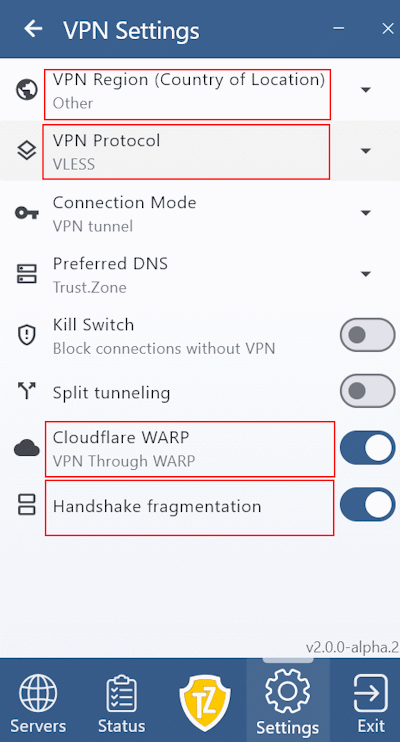 This is where newer connection technologies become useful. Trust.Zone VPN V2 includes VLESS, Shadowsocks and Trojan, connection options designed to work better in difficult or filtered network environments. Trust.Zone also provides Handshake Fragmentation, which changes how the initial connection data is transmitted by splitting it into smaller fragments.
These technologies can make it more difficult for some network-level filtering systems to recognize or interrupt a connection using the same patterns they expect from conventional VPN traffic. This can be particularly useful in heavily censored regions such as Russia, Iran, China and other countries where encrypted or VPN traffic may be actively filtered. Trust.Zone already recommends Handshake Fragmentation and other V2 connection options for restrictive network conditions.
But there is an important limitation: this does not make the VPN server invisible to the website you visit.
VLESS, Trojan, Shadowsocks or Handshake Fragmentation can help when the network between you and Trust.Zone is trying to identify the connection. Once you reach a website, that website can still see the Trust.Zone server IP instead of your real IP.
If the problem comes from the website rather than your ISP, changing the way VPN traffic reaches the server may not solve it. In that situation, a few simpler options are usually more relevant:
No method can guarantee that a particular website will always accept a VPN connection because websites can change their detection and blocking rules at any time.
If the website is not the problem and Trust.Zone itself has difficulty connecting, the approach is different. In Trust.Zone VPN V2, try VLESS, Trojan or Shadowsocks (Settings -> VPN Settings -> VPN Protocol), especially on restrictive networks. You can also enable Handshake Fragmentation here if the connection is being interrupted during its initial stage. If routing itself appears to be the problem, Cloudflare WARP provides another connection option available in Trust.Zone V2. Application uses these tools specifically to improve connectivity under difficult network conditions.
This is why simply saying that a VPN is “detected” does not tell the whole story. A website recognizing a VPN server IP and an ISP identifying VPN traffic are two different problems happening at different points in the connection.
Finally, detecting a VPN does not automatically mean the connection will be blocked. A website may know that an IP belongs to a VPN and still allow access normally. Another may show a CAPTCHA, while a service with stricter fraud or regional rules may refuse the connection completely.
The same is true at the network level. Some networks allow VPN traffic, some limit particular protocols, and others actively try to disrupt VPN connections.